

Chart presentation controls
Present the right target at each step.
Use the remote control to isolate optotypes, vary their presentation and select functional test targets.
Isolate and randomize optotypes
Show a single optotype, a horizontal row or a vertical column. Move the selection and randomize the optotype arrangement within a masking mode.
Vary contrast and reverse polarity
Select a lower-contrast presentation when needed. At full contrast, switch between black-on-white and white-on-black optotypes.
Apply a red–green overlay
Add or remove a red–green overlay on the selected chart. Separate red and green intensity settings let the operator adjust the presentation.
Go beyond standard acuity charts
Select targets such as the astigmatic dial, Worth four-dot, Maddox and red–green stereopsis charts, alongside color-vision plates.
Connected Refraction System
The chart for your connected setup.
Combine GMC-215 with the CV-5600 auto phoropter, RMK-8100 auto refractometer keratometer and GM-300 digital lensmeter. The wireless chart link coordinates visual testing with subjective refraction; measurement-data interfaces are configured separately.
GMC-215 · Wireless chart link
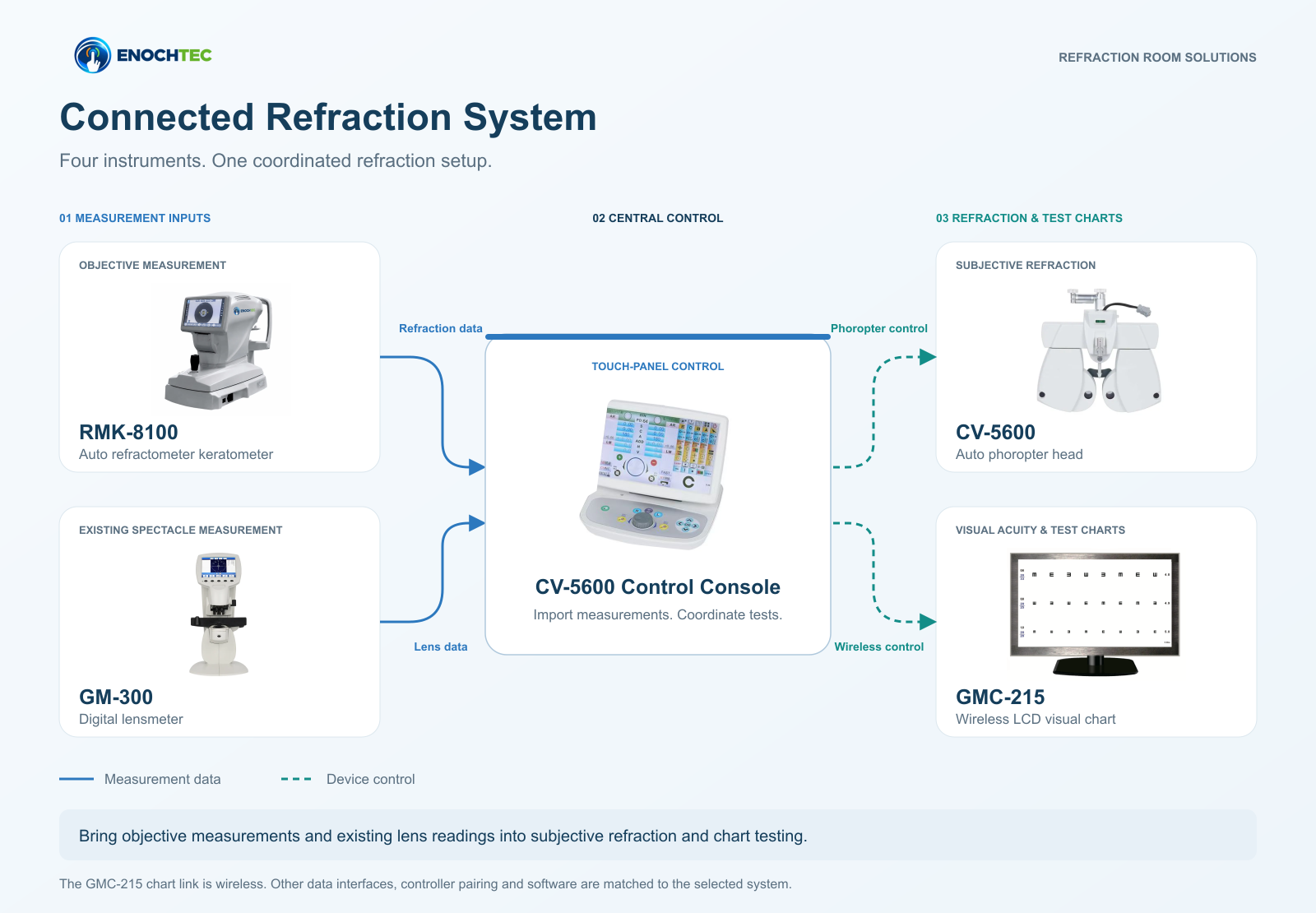
01 / MEASUREMENT INPUTS
Measurement data ↓
Device control ↓
02 / REFRACTION & TEST CHARTS
Specify the connected configuration when ordering. Controller pairing, software version and measurement-data interfaces are matched to the supplied system.
Import starting measurements
Use objective refraction values and existing spectacle readings as inputs to the examination process.
Refine through subjective refraction
Use the CV-5600 console and phoropter to compare lens settings and refine the result with the patient.
Coordinate the test chart
Use the compatible wireless chart connection to present the selected GMC-215 visual tests.
Product Questions
GMC-215 buying guidance
Can the GMC-215 be used with the CV-5600?
The GMC-215 is the chart selected for this ENOCHTEC connected setup with the CV-5600, RMK-8100 and GM-300. Wireless chart control requires the matching phoropter/controller configuration. Specify these models when requesting a quotation.
What test-distance settings are available?
The working distance is adjustable from 2 to 6.25 metres in 0.25-metre increments. The displayed target size changes according to the selected distance.
Does a wireless chart connection make every instrument wireless?
The wireless function is a local connection between the GMC-215 and a compatible auto phoropter; it does not require internet access. RMK-8100 and GM-300 measurement-data connections are specified separately for the selected setup.
Can it be wall-mounted or used on a desk?
Both wall-mounted and desktop arrangements are supported. Confirm the required mounting method and included stand or bracket in the quotation.
Which charts and settings are included?
The chart library includes E, C, number, letter, children’s and functional optotypes and ETDRS charts. Language, test distance and mirror display can be set. Confirm the required interface language and software configuration when ordering.
Build the Connected Configuration
Explore the matching instruments
Discuss your GMC-215 configuration.
Share the intended room setup, connected instruments and destination.